<?xml version="1.0" encoding="utf-8"?>
<feed xmlns="http://www.w3.org/2005/Atom" xmlns:media="http://search.yahoo.com/mrss/">
    <title>Random tech stuff</title>
    <link href="https://blog.antonin.verrier.eu/feed.xml" rel="self" />
    <link href="https://blog.antonin.verrier.eu" />
    <updated>2026-05-11T20:08:00+02:00</updated>
    <author>
        <name>Antonin Verrier</name>
    </author>
    <id>https://blog.antonin.verrier.eu</id>

    <entry>
        <title>[OpenSSH] AuthorizedKeysFile and winbind</title>
        <author>
            <name>Antonin Verrier</name>
        </author>
        <link href="https://blog.antonin.verrier.eu/openssh-authorizedkeysfile-and-winbind/"/>
        <id>https://blog.antonin.verrier.eu/openssh-authorizedkeysfile-and-winbind/</id>
            <category term="sysadmin"/>
            <category term="openssh"/>
            <category term="opensource"/>
            <category term="linux"/>

        <updated>2026-05-11T19:52:15+02:00</updated>
            <summary type="html">
                <![CDATA[
                    <p>A tale about OpenSSH, "winbound" users and the <code>%u</code> variable expansion.</p>

                ]]>
            </summary>
        <content type="html">
            <![CDATA[
                <p>A tale about OpenSSH, "winbound" users and the <code>%u</code> variable expansion.</p>
<hr>
<p><em>(</em><em>Tested on Debian 13 Trixie)</em></p>
<p>Quick note about something I spent waaaaayyyyy too long figuring out.</p>
<p>Let's imagine you want to have some form of central management for AuthorizedKeysFile, so you configure OpenSSH like that:</p>
<p><code>AuthorizedKeysFile /etc/ssh/keys/%u</code></p>
<p>And then you users actually come from an Active Directory domain, so you have winbind, who will give you usernames like <code>DOMAIN\johndoe</code>.</p>
<p>Well, the <code>%u</code> will actually be expanded by OpenSSH as <code>DOMAINjohndoe</code>  (notice the missing slash) for the purposes of SSH login, even if the user actually only logs-in as <code>johndoe</code>.</p>
<p>Meanwhile, <a href="https://github.com/jbeverly/pam_ssh_agent_auth">pam_ssh_agent_auth</a> (PAM module which allow, for example, pseudo password-less sudo) will actually expand <code>%u</code> to <code>DOMAIN\johndoe</code>.</p>
            ]]>
        </content>
    </entry>
    <entry>
        <title>[OpnSense] allow router to connect across IPSec tunnel</title>
        <author>
            <name>Antonin Verrier</name>
        </author>
        <link href="https://blog.antonin.verrier.eu/opnsense-allow-router-to-connect-across-ipsec-tunnel/"/>
        <id>https://blog.antonin.verrier.eu/opnsense-allow-router-to-connect-across-ipsec-tunnel/</id>
            <category term="opnsense"/>
            <category term="opensource"/>
            <category term="networking"/>

        <updated>2026-05-11T17:54:55+02:00</updated>
            <summary type="html">
                <![CDATA[
                    <p>A bit on OpnSense IPSec tunneling and the routing config that should probably have been on by default.</p>

                ]]>
            </summary>
        <content type="html">
            <![CDATA[
                <p>A bit on OpnSense IPSec tunneling and the routing config that should probably have been on by default.</p>
<hr>
<p><em>(Tested on OpnSense 26.1)</em></p>
<p>When setting up an IPSec tunnel in OpenSense, by default, the tunnel will not be used to to access remote hosts by services running on the firewall host itself (eg. : LDAP for auth, syslog, etc.)</p>
<p>To allow services running on OpenSense to use the tunnel:</p>
<ol>
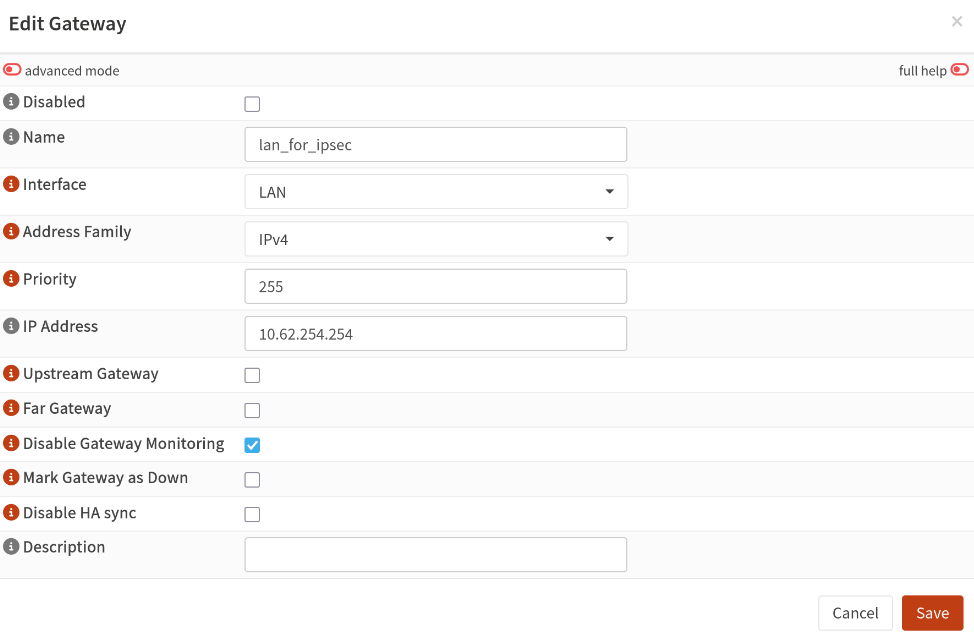
<li>Create a gateway (<code>System</code> &gt; <code>Gateways</code> &gt; <code>Configuration</code>), bind it to the LAN interface, with the LAN IP as the gateway IP<figure class="post__image"><img loading="lazy"  style="font-size: inherit;" src="https://blog.antonin.verrier.eu/media/posts/1/Copie-decran_20260511_175151.png" alt="gateway creation screenshot" width="974" height="642" sizes="(min-width: 920px) 703px, (min-width: 700px) calc(82vw - 35px), calc(100vw - 81px)" srcset="https://blog.antonin.verrier.eu/media/posts/1/responsive/Copie-decran_20260511_175151-xs.png 300w ,https://blog.antonin.verrier.eu/media/posts/1/responsive/Copie-decran_20260511_175151-sm.png 480w ,https://blog.antonin.verrier.eu/media/posts/1/responsive/Copie-decran_20260511_175151-md.png 768w ,https://blog.antonin.verrier.eu/media/posts/1/responsive/Copie-decran_20260511_175151-lg.png 1024w"></figure></li>
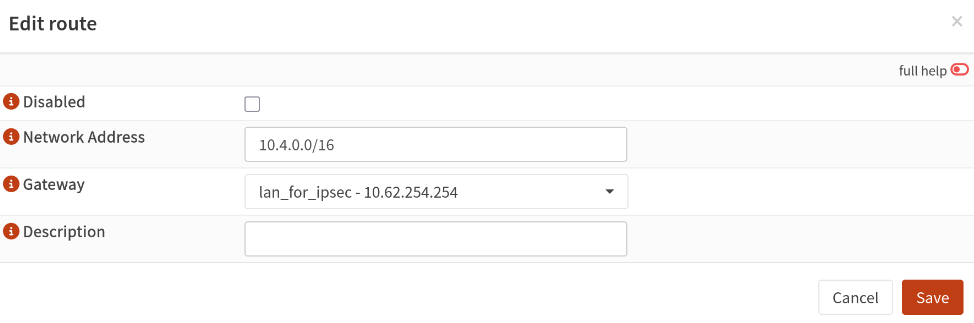
<li>Create a route (<code>System</code> &gt; <code>Routes</code> &gt; <code>Configuration</code>) for the remote subnet and bind it to the gateway you just created<figure class="post__image"><img loading="lazy"  style="font-size: inherit;" src="https://blog.antonin.verrier.eu/media/posts/1/Copie-decran_20260511_175242.png" alt="Route creation screenshot" width="974" height="323" sizes="(min-width: 920px) 703px, (min-width: 700px) calc(82vw - 35px), calc(100vw - 81px)" srcset="https://blog.antonin.verrier.eu/media/posts/1/responsive/Copie-decran_20260511_175242-xs.png 300w ,https://blog.antonin.verrier.eu/media/posts/1/responsive/Copie-decran_20260511_175242-sm.png 480w ,https://blog.antonin.verrier.eu/media/posts/1/responsive/Copie-decran_20260511_175242-md.png 768w ,https://blog.antonin.verrier.eu/media/posts/1/responsive/Copie-decran_20260511_175242-lg.png 1024w"></figure></li>
</ol>
<p>That's it!</p>
            ]]>
        </content>
    </entry>
</feed>
